
How to Use Claude Code in Development Workflows
Most teams use Claude Code in the terminal. Some run it autonomously — triggered by webhooks, cron jobs, and tickets — automating repetitive development work.
Claude Code is more than a terminal tool
Most developers use Claude Code interactively. You type a prompt, it writes code, you iterate. This already delivers huge value. A single developer with Claude Code in the terminal can debug faster, refactor more confidently, and ship features that would have taken days in hours.
But some workflows don't need a developer doing the work. Bug triage, dependency updates, PR reviews, CI failure analysis. These are repetitive, well-defined tasks. When Claude Code handles them automatically, triggered by events and producing PRs for human review, your team gets leverage without adding headcount.
The real productivity unlock with Claude Code isn't using it faster. It's shifting developers from doing routine work to reviewing it.
This post covers three modes of using Claude Code — interactive, scripted, and background (autonomous) — and what infrastructure you need to make background agent workflows production-ready.
How Claude Code works: a quick primer
If you're already using Claude Code daily, skip ahead. This section is for context.
Claude Code isn't a chatbot that generates code snippets. It's an agent. Give it a bug report and a repo, and it will read the relevant code, write a fix, and run your test suite. That's fundamentally different from autocomplete.
Under the hood, it uses the Anthropic API, which means every invocation has a cost. This matters for automation: when you move from a developer running a few prompts per day to hundreds of automated runs per week, cost tracking becomes an infrastructure concern.
Three programmatic interfaces
For automated workflows, you need to invoke Claude Code without a developer at the keyboard. There are three ways to do this.
CLI headless mode. Run claude -p "your prompt" for non-interactive execution. The -p flag tells Claude Code to process the prompt, complete the task, and exit. Key flags for automation:
claude -p "Fix the failing tests" \
  --output-format stream-json \
  --verbose \
  --max-turns 10 \
  --max-budget-usd 5
--output-format stream-json streams structured events as the agent works, useful for real-time progress tracking in CI. --max-turns caps how many agentic turns the agent can take. --max-budget-usd sets a hard dollar limit per run.
Claude Agent SDK. A TypeScript and Python library (formerly called Claude Code SDK) with an async query() streaming API for embedding Claude Code directly in your applications. Package names: @anthropic-ai/claude-agent-sdk (TypeScript) and claude-agent-sdk (Python). Use this when you need programmatic control beyond what CLI flags offer: custom event handling, streaming responses, or integration into your own backend.
GitHub Actions. The official action anthropics/claude-code-action@v1 supports @claude mentions in PRs, custom prompts on PR and issue events, and scheduled triggers. The lowest-friction option if your code lives on GitHub.
For full details, see the CLI documentation and the Agent SDK overview.
Three modes of using Claude Code
Here's the mental model that frames everything else in this article.
Mode 1: Interactive
Developer at a terminal, real-time conversation. You type, Claude Code responds, you iterate. You're in the loop the entire time.
Best for: exploratory work, debugging, learning a new codebase, prototyping, complex tasks that need human judgment mid-process.
Infrastructure: your machine. No special requirements.
This is where most developers are today, and for good reason. Interactive usage is where Claude Code shines brightest: you steer the agent, catch mistakes early, and iterate until the result is right. For most individual developer work, this is the right mode.
Mode 2: Scripted
Claude Code invoked from scripts, git hooks, or CI steps. Still triggered by developer actions, but the prompts are predefined and the execution is hands-off.
Best for: repeatable tasks like pre-commit code review, post-merge checks, automated PR descriptions.
Infrastructure: CI runner or local machine, basic cost controls (--max-budget-usd).
A developer still kicks off the process (by pushing code, opening a PR), but the agent work is automated. Low risk, immediate value.
The limitation: Mode 2 still requires a developer action to trigger the work. The agent doesn't initiate anything on its own.
Mode 3: Background (Autonomous)
Claude Code triggered by external events: webhooks, schedules, ticket assignments. No developer starts the process. A developer reviews and merges the result.
This is what the industry calls a background agent — an autonomous AI system that receives a trigger, reasons about a codebase, writes code, runs tests, and opens a pull request, all without human intervention. The term has been adopted by Cursor and engineering teams at Spotify and Ramp — Spotify's background agent has produced over 1,500 merged PRs, and Ramp's writes more than 30% of their merged PRs.
Best for: team-wide automation, maintenance at scale, building AI-powered products.
Infrastructure: this is where it gets serious. Running an AI coding agent autonomously means you need isolated execution environments, network control, cost limits, and audit trails.
Most teams use Mode 1 and Mode 2 well. Background agents make sense when you have repetitive, well-defined workflows that don't need a developer making decisions mid-process. They require fundamentally different infrastructure than a developer laptop or a CI runner.
Here's an example. A weekly cron triggers dependency updates across repos. This is what it looks like as a two-step Make scenario: coSPEC runs the agent on a schedule, then Slack notifies the team:
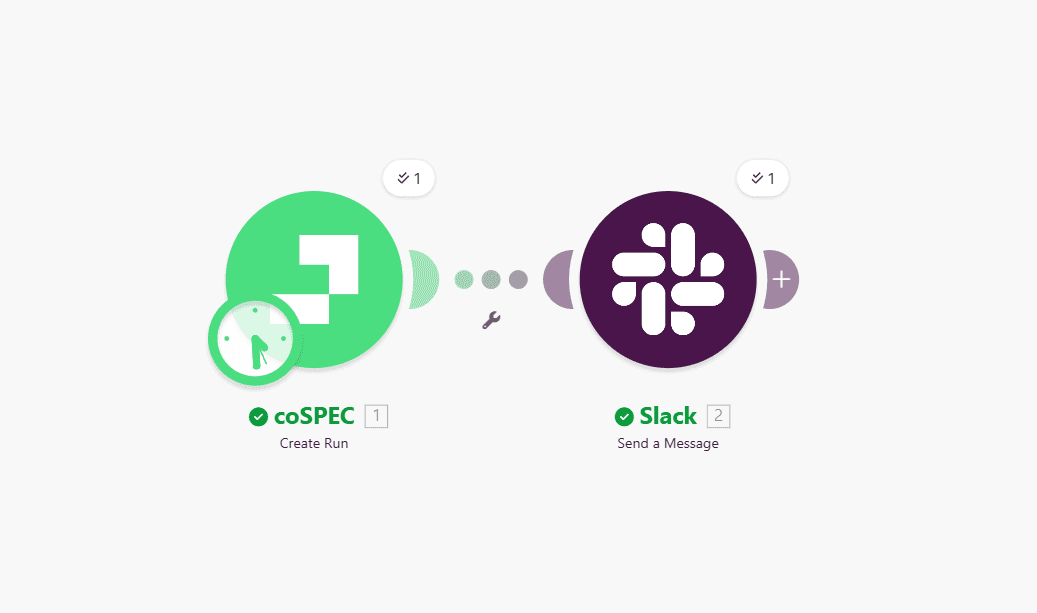
Ticket-to-PR automation works the same way: a Jira or Linear ticket gets assigned to AI, the agent implements the change and opens a PR.
What background agents need to be production-ready
Five infrastructure requirements
Isolated execution environments. Each agent run needs its own sandbox: clean filesystem, isolated process space, nothing shared between runs. When one run finishes, everything is torn down.
Security controls. The agent has access to your code, your dependencies, and potentially your network. You need network control (decide which domains the agent can reach and block everything else) and time limits to kill runs that hang.
Cost management. One runaway agent loop can burn through API credits fast. Claude Code's --max-budget-usd flag helps at the CLI level, but you also need infrastructure-level enforcement: a hard kill switch when spending exceeds your threshold. Per-run limits and aggregate daily limits are both necessary.
Audit trail. When something goes wrong, you need to know exactly what the agent did. Every command executed, every file changed, every API call made, every token spent. Not just logs buried in CI output, but a structured, queryable record.
Human-in-the-loop. Background agents produce PRs, not direct merges. Review gates are not optional. Autonomous does not mean unsupervised.
The infrastructure reality
Building this yourself means container orchestration for sandboxes, network policies for egress control, cost tracking across runs, log aggregation for audit trails, and secret management across isolated environments.
This is what coSPEC does. One API call to run any agent in an isolated sandbox with network control, cost limits, and a full audit trail. You define the workflow and the triggers. coSPEC handles sandboxing, security, and observability.
For a deeper dive into the security considerations around running AI coding agents:

Getting started
If you're using Claude Code interactively and it's working, keep doing that. Not every team needs autonomous workflows.
But if you or your team are spending hours on tasks that follow the same pattern every time, that's a sign you're ready for Mode 3. Start with one workflow, for example scheduled dependency updates across your repos, and expand from there as you see what works. coSPEC gives you sandboxed execution, network control, and cost tracking out of the box.
Sign up for the beta using the button below to try it out.
FAQ
Can Claude Code run without a developer at the keyboard?
What is a background agent?
What infrastructure do background agents need?
How much does it cost to run Claude Code autonomously?
Claude Code CLI Reference · Anthropic
Claude Agent SDK Overview · Anthropic
claude-code-action · GitHub
Cloud Agents (formerly Background Agents) · Cursor
Spotify's Background Coding Agent, Part 1 · Spotify Engineering

Ready to get started?