Runs
Create, monitor, and manage agent execution sessions
What Are Runs?
A run is a single agent execution. You provide a prompt and a repository — coSPEC provisions a sandbox, runs the agent, and returns the output. Each run is isolated, time-limited, and fully audited.
Creating a Run
Start a run by sending a prompt and repository to the API:
curl -X POST https://api.cospec.io/v1/runs \
  -H "Authorization: Bearer csk_live_..." \
  -H "Content-Type: application/json" \
  -d '{
    "repo": "your-org/your-repo",
    "prompt": "Refactor the auth middleware to use JWT",
    "template": "your-template",
    "model": "sonnet"
  }'
See the Create Run API reference for all available fields.
Run Lifecycle
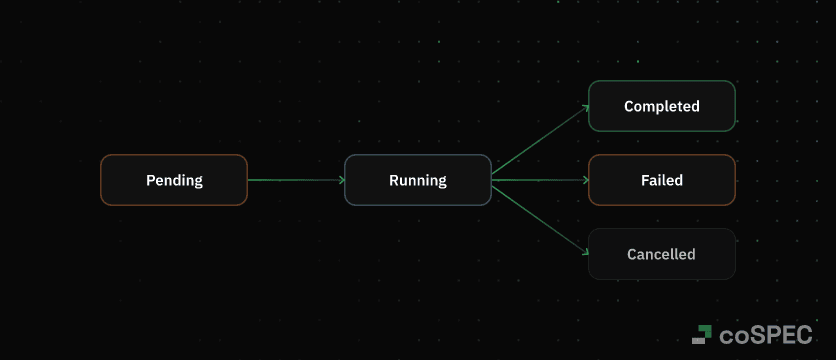
| Status | Description |
|---|---|
pending | Run is queued, sandbox is being provisioned |
running | Agent is executing inside the sandbox |
completed | Agent finished successfully |
failed | Agent hit a guardrail or encountered an error |
cancelled | Run was cancelled via the API |
Outputs
Outputs are detected automatically based on what the agent does during the run. You don't configure them upfront — they are collected as the agent works.
| Type | Detected when |
|---|---|
text | Agent produces a final text response |
branch | Agent pushes changes with git push |
pr | Agent creates a pull request or merge request |
issue | Agent creates an issue |
A single run can produce multiple outputs. For example, an agent might push a branch and open a pull request in the same run.
Guardrails
Guardrails cap resource usage per run. Set them on the run directly or as defaults on a template.
| Guardrail | Range | Default | Description |
|---|---|---|---|
maxTurns | 1–1000 | 100 | Maximum agent turns |
maxCostUsd | $0.01–$1000 | $5 | Maximum Anthropic API cost |
timeoutSeconds | 30–3600 | 1800 | Maximum wall-clock time |
When a guardrail triggers, the run stops with status: failed and a failReason of max_turns, max_cost, or timeout.
A run can also fail with failReason: error and error code RUN_RESOURCE_LIMIT_EXCEEDED if the sandbox runs out of memory.
Sandbox Size
The sandbox size used for a run comes from the template. The run response includes a sandbox object with the resolved size and resource limits:
{
  "sandbox": {
    "id": "snd_...",
    "size": "m",
    "resources": {
      "cpuMillis": 2000,
      "memoryMi": 4096,
      "diskMi": 10240
    }
  }
}
To use a different size, update the template's size field. See Templates — Sandbox Sizes.
Environment Variables
Pass per-run environment variables using the env field. These are merged with template defaults — run values win on conflict.
Getting Results
Three ways to get results from a run:
| Method | How it works | Best for |
|---|---|---|
| Polling | Poll GET /v1/runs/:id every 5–10 s | Simple scripts |
| Webhooks | Signed push to your server for all runs in your org | Production integrations |
callbackUrl | Unsigned push to a URL you set per run | Quick prototyping |
See the Webhooks guide for setup and signature verification.
Managing Runs
Use the API to monitor, cancel, and list runs. See the Runs API reference for details.