Getting Started
From zero to first run in under 5 minutes
Prerequisites
- A coSPEC account (contact us to request access)
- An Anthropic API key (for the AI model)
1. Connect a Repository
Connect at least one git provider in Integrations:
- GitHub — Go to Integrations → GitHub → Connect Account. You'll be redirected to GitHub's authorization page. See GitHub Integration.
- GitLab — Go to Integrations → GitLab → Connect Account (gitlab.com) or Connect Self-Hosted (your own instance). See GitLab Integration.
2. Store Your Anthropic Key
Go to Integrations → Claude Code in the dashboard. Enter your Anthropic API key and click Connect.
coSPEC stores your key securely and injects it into the sandbox at runtime. The agent uses your Anthropic API Key to call Claude models directly.
3. Get Your API Key
In the dashboard, go to API Keys → Create API Key.
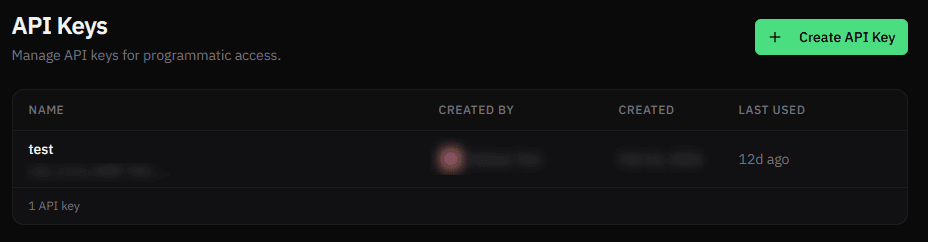
Keys use the format csk_live_* and are shown only once at creation. Store it securely. You can use it to start your first run.
See API Keys for details on key management.
4. Start Your First Run
Pick your tool and follow the guide:
| Platform | Install | How Results Arrive | Best For |
|---|---|---|---|
| Zapier | Invite link | Automatic (step waits) | Simplest setup, one-step Zaps |
| Make | Invite link | Webhook trigger (separate scenario) | Multi-step scenarios |
| n8n | Community node | Polls automatically or webhook trigger | Self-hosted, AI agent workflows |
| REST API | None | Poll or webhook | Custom code, scripts |
| GitHub Actions | Coming soon | Workflow step | CI/CD pipelines |
| MCP | Coming soon | Tool call response | AI coding assistants |
Quick test with curl
You can also create a run directly from the command line:
curl -X POST https://api.cospec.io/v1/runs \
  -H "Authorization: Bearer csk_live_..." \
  -H "Content-Type: application/json" \
  -d '{
    "repo": "your-org/your-repo",
    "prompt": "Add input validation to the signup form",
    "template": "your-template",
    "model": "sonnet"
  }'
It returns:
{
    "id": "run_g6eUfRr68f",
    "status": "pending",
    "createdAt": "2026-01-01T00:00:00.000Z"
}
Poll the run status until it completes:
curl https://api.cospec.io/v1/runs/:id \
  -H "Authorization: Bearer csk_live_..."
Runs move through the lifecycle: pending → running → completed. When the run finishes, you'll see the output — text responses, branches, pull requests, or issues.
See the REST API guide for the full walkthrough.
What's Next
- Learn more about Runs — lifecycle, outputs, and guardrails
- Customize sandbox environments with Templates
- Explore all endpoints in the API Reference